

Table of Contents
Introduction
Capacitive touch screens have become a fundamental part of our daily lives. From smartphones to interactive whiteboards and digital signage, this technology has redefined the way we interact with our devices. Whether you’re a consumer or a business owner looking to integrate this technology, understanding the capacitive touch screen can help you get the most out of it.
In this blog, we’ll take a look at how capacitive touch screens work, their benefits, how to maintain them, and more.

What is a Capacitive Touch Screen?
A capacitive touch screen is a display that uses the electrical properties of your body (your fingers) to register touch. It works differently from resistive screens, which detect physical pressure. Instead, a capacitive screen detects changes in the electrical field when your finger (or another conductive material) comes into contact with the surface. This allows for a more sensitive and accurate touch response, which is why capacitive screens are preferred for devices like smartphones, tablets, and even modern ATMs.
Key Features of Capacitive Touch Screens
| Feature | Description |
|---|---|
| High Sensitivity | Reacts to the lightest touch and supports gestures like pinch and zoom. |
| Durable | Made with toughened glass, making it resistant to scratches and wear. |
| Multi-Touch Support | Supports multiple touch points at once, allowing for gestures like swiping, pinching, and scrolling. |
| Clarity and Brightness | Provides high clarity and brightness, delivering sharp, vibrant images and videos. |
How Does a Capacitive Touch Screen Work?
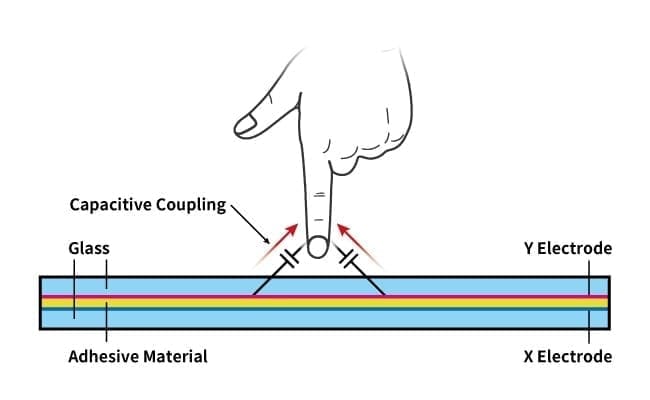
At its core, a capacitive touch screen works by sensing changes in the electrostatic field caused by your finger. Here’s a quick breakdown of the process:
- The screen has a conductive layer, typically made from materials like indium tin oxide (ITO), that creates a uniform electrical field across the surface.
- When your finger (which carries a small electric charge) touches the screen, it disturbs this field.
- The screen sensors, typically located at the corners or edges, detect this disturbance and transmit the information to the device’s processor.
- The processor then determines the exact location of your touch and reacts accordingly (e.g., opening an app or zooming in on a photo).
Advantages Over Resistive Screens
| Feature | Capacitive Screen | Resistive Screen |
|---|---|---|
| Sensitivity | High, even with a light touch | Requires more pressure |
| Durability | Scratch-resistant, durable | Prone to wear and tear |
| Multi-Touch Capability | Yes, supports gestures | No, limited to a single touch |
| Clarity and Brightness | Superior clarity, brighter | Lower clarity, less brightness |
Capacitive screens are known for their high responsiveness, better durability, and clear displays—making them the better choice for modern touch devices.
How to Clean a Capacitive Touch Screen?
While capacitive touch screens are quite durable, they do require proper maintenance to stay in top shape. Here’s how you can clean your capacitive touch screen without damaging it:
Step-by-Step Guide:
- Power Off Your Device: This is to avoid any accidental touches or disruptions.
- Use a Soft Microfiber Cloth: Gently wipe the screen using a microfiber cloth. It’s great for removing dust and fingerprints without scratching the surface.
- Apply Screen Cleaner (Optional): If your screen is particularly dirty, lightly dampen the cloth with a screen-safe cleaner (preferably alcohol-free). Do not apply cleaner directly to the screen.
- Avoid Abrasive Materials: Never use paper towels, tissues, or anything rough, as they can leave scratches on the screen.
- Dry the Screen: After cleaning, use a dry microfiber cloth to wipe off any remaining moisture.
Pro Tips for Maintaining Your Capacitive Screen
| Tip | Why It Works |
|---|---|
| Use a Screen Protector | It adds an extra layer of protection against scratches and smudges. |
| Regular Cleaning | Helps maintain screen clarity and responsiveness, preventing buildup that can hinder performance. |
| Avoid Harsh Chemicals | Harsh cleaners can strip away the screen’s protective coating, reducing its lifespan. |
Regular cleaning not only improves the appearance of your screen but also helps maintain its functionality and longevity.
How Does Capacitive Touch Screen Work?
A capacitive touch screen is designed to work using the natural capacitance of your body. When you touch the screen, your body creates a minor electrical disturbance that the screen detects. This is different from resistive touch screens, which detect physical pressure instead of electrical changes. Capacitive touch screens offer faster response times and can detect multiple touch points simultaneously, which is why they’re the preferred choice for modern technology.
Capacitive vs. Resistive: A Quick Comparison
| Feature | Capacitive Touch Screen | Resistive Touch Screen |
|---|---|---|
| Touch Sensitivity | High, reacts to light touch | Moderate, needs more pressure |
| Multi-Touch | Yes | No |
| Clarity | Bright and clear | Less clear, dimmer |
| Durability | Very durable, scratch-resistant | Prone to wear over time |
Capacitive screens are ideal for multitasking and applications that require precise touch, making them far superior to resistive screens in most modern devices.
Conclusion
Capacitive touch screens have changed the way we interact with technology. Their high sensitivity, multi-touch capability, and durability make them an ideal choice for a wide range of devices. Whether you’re using a smartphone, tablet, or interactive display, understanding how capacitive touch screens work, how to maintain them, and the benefits they offer can help you enjoy a better user experience.
At HUAKETEK, we offer innovative capacitive touchscreen solutions for various applications. If you’re looking to enhance your devices with responsive, high-quality touch technology, get in touch with us to learn more about how our products can elevate your user experience.
FAQ
What is a capacitive touch screen?
A capacitive touch screen is a display that uses the electrical properties of your body to detect touch. It’s more responsive and durable compared to resistive touch screens.
How do capacitive touch screens work?
Capacitive screens detect changes in the electrostatic field when a conductive object (like your finger) touches the screen. The device then processes this information to determine the location of the touch.
How do I clean a capacitive touch screen?
Use a microfiber cloth to gently clean the screen. Apply a screen-safe cleaner if necessary, but avoid harsh chemicals or abrasive materials.
Why should I choose a capacitive touch screen over a resistive one?
Capacitive screens offer higher sensitivity, better clarity, multi-touch capability, and greater durability compared to resistive screens.
Can I use a capacitive touch screen with gloves?
Some capacitive touch screens can be used with specific types of gloves designed to work with the screen’s electrical field. However, standard gloves may not be effective.